How to Generate Amazon Affiliate Links Faster
Category: How to generate amazon affiliate link
When it comes to creating Amazon affiliate links, you have two main paths. You can use Amazon's own SiteStripe toolbar to create links one by one, or you can lean on a tool like Coral to automate the entire process. The right choice really boils down to whether you need a quick, simple link here and there, or if you're looking for an efficient way to manage a high volume of them with better tracking.
A Smarter Way to Generate Amazon Affiliate Links
If you're an Amazon Associate, making affiliate links is just part of the daily grind. The most common way to do this is by hand, generating each link individually. That works perfectly fine when you're just recommending a product or two.
But what happens when you're putting together a big gift guide, a product roundup, or a major campaign? Suddenly, that manual process becomes a huge time-sink. Copying and pasting dozens of links isn't just slow—it's incredibly easy to make a mistake, grab the wrong link, or mess up your tracking.
Let's walk through a much better workflow. First, we'll cover the traditional manual method using Amazon's SiteStripe so you have a solid baseline. Then, I'll show you a significantly faster and more accurate way to do it using an affiliate management platform like Coral. You'll see exactly how automation can take over tedious jobs like bulk link creation and adding custom tracking parameters, saving you hours of work. For a deeper dive into managing your programs, this affiliate management guide is a great resource.
Manual Generation vs Coral Automation
The real difference between manual and automated methods comes down to scale and precision. The manual approach is straightforward and accessible, but it just doesn't have the muscle for high-volume publishing. Coral's automation, on the other hand, is built from the ground up for efficiency, accuracy, and giving you deep insights into what’s actually working. Seeing how these two stack up is the first step in fine-tuning your affiliate strategy. To get a better handle on the Amazon ecosystem itself, check out this excellent Amazon affiliate guide.
The biggest leap you'll make in affiliate marketing is when you shift from just creating links to strategically managing them. Automation gives you the accuracy and data you need to turn a side hustle into a real, scalable business.
Here's a straightforward comparison to show you the practical differences between making links by hand and using a tool like Coral.
| Feature | Manual Method (SiteStripe) | Coral Automation |
|---|---|---|
| Link Creation Speed | Slow; you're stuck generating links one at a time. | Fast; you can create hundreds of links in minutes. |
| Bulk Generation | Not an option. Every single link requires manual effort. | Yes; this is a lifesaver for gift guides and big articles. |
| Accuracy | Prone to human error (wrong links, incorrect IDs). | High accuracy thanks to automated validation. |
| Custom Tracking | Basic Tracking ID support. | Advanced custom parameters (sub-IDs) for detailed insights. |
| Best For | New affiliates or small-scale content with just 1-5 links. | Professional publishers managing multiple sites and campaigns. |
| Time Savings | Minimal; the workflow is inherently time-intensive. | Significant time savings, freeing you up for content creation. |
Getting Started with Amazon Associates
Before you can even think about creating your first Amazon affiliate link, you need to get your Amazon Associates account set up and approved. This is the absolute first step, and getting it right from the start saves a lot of headaches later. It’s your ticket to generating links and actually earning commissions.

The sign-up process itself is pretty simple, but don't rush through it. You'll need to create your account and then submit your main content platform—like your blog, website, or social media channel—for Amazon to review.
This is where the quality of your site really comes into play. Amazon wants to see a platform that looks professional and provides value. In fact, understanding the importance of a well-designed website can make or break your approval chances.
Navigating the Initial Account Setup
Once Amazon gives you the green light, you'll get access to the Associates dashboard. This is your command center. Spend some time clicking around to see where you can find products, check your performance reports, and handle your account settings. Pay close attention to the reporting tools—that's where you'll track your clicks, sales, and earnings.
You’ll also need to fill out your tax and payment information during setup. Make sure every detail is correct, otherwise, you could run into frustrating delays when it's time to get paid. Amazon gives you a few options for receiving your money, like direct deposit, an Amazon gift card, or a check.
Understanding the Associates Program
Let's be clear: the Amazon Associates Program is a giant in the affiliate world. It kicked off way back in 1996, making it one of the very first online affiliate programs, and it’s still the biggest one out there. As of 2025, it commands a massive 46.2% of the global affiliate marketing market share, which shows just how influential it is.
As an affiliate, you can create your unique links right from the Amazon website using tools like the SiteStripe toolbar once you're logged into your approved account.
A properly set up Associates account does more than just let you create links. It provides the data you need to understand your audience and make smarter content decisions. Think of it as your business headquarters.
To keep your account active and in good standing, you have to play by Amazon's rules, which are laid out in their Associates Program Operating Agreement. Here are the big ones:
- Disclosure: You have to be upfront with your audience. A clear statement that you're an Amazon Associate and might earn from their purchases is a must. This isn't just a suggestion; it's a legal requirement in many places.
- Link Usage: Don't try to hide or cloak your links. They are meant for your approved website or social media profile, not for offline things like emails or PDFs.
- Purchasing: You can't use your own links to buy things for yourself and earn a commission.
Stick to these guidelines, and you'll build a solid, long-term relationship with Amazon. With your account fully set up and the rules clear, you're ready for the fun part: creating those links.
The Standard Way to Make Affiliate Links
Once you're approved as an Amazon Associate, you can jump right into creating affiliate links. The most straightforward path is using Amazon's own SiteStripe toolbar. This handy bar automatically appears at the top of every Amazon page as long as you're logged into your Associates account, making it super convenient to grab a link whenever you find a product you want to share.
This method is the official, Amazon-supported way to get started. It's built for speed and simplicity, letting you create a link for any product you see without ever having to leave the page. For new affiliates, it's the perfect starting point.
A Step-by-Step Guide to Using the SiteStripe Toolbar
Creating a link with SiteStripe is dead simple. You just head over to the product page you want to promote and click a few buttons on the toolbar. It's a great way to get the hang of how to generate an Amazon affiliate link for individual items.
Here’s the process from start to finish:
- Find Your Product: First, navigate to the exact item on Amazon.com you want to recommend.
- Pick a Link Type: Look at the SiteStripe toolbar. You'll see options for "Text," "Image," or "Text+Image." Choose the one that makes the most sense for where you'll be placing it.
- Generate the Link: Click your selection. A small window will pop up showing your unique affiliate link or the HTML code you'll need.
- Select a Tracking ID: If you manage multiple websites or campaigns, you probably have a few Tracking IDs. Make sure to choose the right one from the dropdown menu so your commissions are attributed correctly.
- Copy and Paste: All that's left is to copy the link or code and paste it into your blog post, social media update, or anywhere else you plan to share it.
This process is perfect when you only need a few links here and there. But its manual nature can become a real drag if you're putting together bigger content, like a holiday gift guide or a massive product roundup. This is exactly why many creators eventually look for a dedicated Amazon Associates app to handle things more efficiently.
The SiteStripe toolbar is fantastic for learning the ropes. It teaches you the basics of link creation, but its one-by-one approach quickly becomes a major bottleneck once your affiliate marketing efforts really start to scale.
Types of Links You Can Create Manually
The SiteStripe toolbar offers a few different link formats, each designed for a specific purpose. Knowing which one to use can help you weave your recommendations into your content more naturally.
- Text Links: These are your standard, basic hyperlinks. You can grab either a full-length URL or a tidier, shortened
amzn.tolink. They're perfect for in-text mentions, like when you write "this is my favorite coffee maker" and link that phrase directly to the product. - Image Links: This option gives you a snippet of HTML code that embeds a product image on your site, which also doubles as a clickable affiliate link. It's a great visual tool for sidebars or within detailed product reviews.
- Text+Image Links: This format generates a small, self-contained box with the product's image, title, current price, and a "Buy Now" button. It works like a mini-advertisement and is ideal for dedicated product feature sections.
Looking ahead to 2025, the core process for creating an Amazon affiliate link still revolves around the Associates Program dashboard and tools like SiteStripe. Success, however, continues to depend heavily on getting eyes on those links. Search engine optimization (SEO) is a massive driver, accounting for over 69% of traffic for most affiliate marketers. Social media is also a huge piece of the puzzle, contributing to 67% of affiliate-driven sales. This manual, traffic-dependent model is precisely what highlights the need for smarter, more advanced solutions.
The Coral Advantage: Bulk Creation and Custom Tracking
While Amazon's SiteStripe toolbar is a decent starting point, you’ll quickly hit a wall once you get serious about affiliate marketing. Building a massive gift guide or detailed product roundup with a manual, one-by-one process becomes a serious drag on your time. This is precisely where tools like Coral come in, transforming a tedious chore into a smart, efficient operation with its advanced link generation features.

The real difference isn't just about saving a few minutes. It's about being able to scale your efforts, maintain accuracy, and gather the kind of data that actually helps you make more money. Let's put these two methods head-to-head to show why making the switch is a game-changer for any serious publisher.
Speed and Efficiency: A Real-World Scenario
Let's get practical. Imagine you're putting together a "Top 100 Holiday Gifts" guide for Black Friday. If you use SiteStripe, your workflow for every single product is to find it on Amazon, click the "Text" button, pick your Tracking ID, copy the link, and then paste it into your article. Even if you're fast and it only takes a minute per link, that’s 100 minutes—over an hour and a half of mind-numbing, repetitive work.
Now, picture doing this with Coral's bulk creation feature. You simply gather a list of all your product URLs or ASINs, upload it, and generate all 100 affiliate links in one go, complete with your chosen tracking parameters. The whole thing takes less than five minutes.
The time you get back isn't just a small perk; it’s a massive strategic advantage. Instead of being bogged down by mechanical tasks, you can spend those hours doing what actually grows your business: writing better content, working on your SEO, or promoting your articles.
This speed is even more critical when you have to update your content. What if half the products in that guide go out of stock? Manually replacing 50 links is another hour-long headache. With Coral's automation, you can generate a new batch of links in a few minutes, keeping your content fresh and profitable with almost no effort.
Accuracy and Error Prevention
Let's be honest, generating links by hand is asking for trouble. A simple copy-paste mistake can lead to a broken link, which means a lost sale. Even worse, you could grab a link with the wrong Tracking ID. When that happens, you lose the commission even if someone buys the product. These tiny errors add up, and they can cost you a surprising amount of revenue over time.
Coral's automation practically eliminates this risk. The platform automatically checks links and attaches the right tracking parameters every single time. There's no manual copying and pasting, so you can be confident every link is built to earn you a commission. That built-in accuracy protects your income and gives you peace of mind.
Scalability and Advanced Tracking with Custom Parameters
If you're managing more than one website or running different marketing campaigns, the manual method just won't cut it. Trying to create hundreds of links with SiteStripe would feel like a full-time job. It simply doesn't scale.
Coral's automation, on the other hand, is designed for volume. It handles big batches of links without breaking a sweat. More importantly, it gives you access to advanced tracking features that SiteStripe can't offer. For instance, Coral lets you add custom parameters (or sub-IDs) to your links. You could tag links to see what performs better: a product mentioned in your intro, a button in a comparison table, or an image in your sidebar.
This kind of granular data is gold. It shows you exactly which on-page elements are driving clicks and sales. With that information, you can optimize your page layouts, focus on the link types that work best, and make smart, data-driven decisions that directly boost your earnings. A well-organized Amazon affiliate platform can centralize this information, making it easy to see what's working across all your efforts.
To really see the difference, let’s break it down side-by-side. The table below highlights the key contrasts between the manual and automated approaches.
Comparing Manual Link Generation and Coral Automation
| Capability | Manual Method (SiteStripe) | Coral Automation |
|---|---|---|
| Workflow | Individual link creation; find product, click, copy, paste. | Bulk upload a list of products (ASINs/URLs) to generate all links at once. |
| Time for 100 Links | Approximately 1.5 - 2 hours of repetitive, manual work. | Under 5 minutes for the entire batch. |
| Error Rate | High potential for copy-paste errors, broken links, or incorrect Tracking IDs. | Near-zero error rate due to automated link validation and parameter appending. |
| Tracking Customization | Limited to selecting a predefined Tracking ID from a dropdown list. | Supports custom sub-IDs for granular performance tracking (e.g., giftguide-top-pick). |
| Best Use Case | Best for beginners or content with fewer than 10 affiliate links per article. | Essential for professional publishers, large-scale content, and data-driven optimization. |
| Updating Content | Time-consuming; requires manually finding and replacing each outdated link one by one. | Fast and simple; regenerate a new batch of links for updated products in minutes. |
Ultimately, the manual method is a perfectly fine way to get your feet wet and learn the basics. But it puts a hard limit on your growth. To build a truly scalable and profitable affiliate business, embracing automation isn't just a nice-to-have—it's a strategic necessity. The gains in speed, accuracy, and data insights are too significant to ignore.
How Bulk Creation and Custom Tracking Boost Earnings
While the last section covered the speed and accuracy you get from automation, the real money is in the advanced features. When you move past generating one link at a time, tools like Coral open up a whole new world of strategy that professional affiliates depend on for growth. Two of the most powerful features are bulk link creation and custom tracking parameters.
These tools help you shift from being reactive to proactive. Instead of just grabbing a link when you need one, you can start building and managing entire campaigns with surgical precision. It turns your affiliate strategy into a finely-tuned, data-driven operation.
Transforming Workflows with Bulk Link Creation
Picture this: you need to update a "Best Of" article that features 50 different products. Doing this manually is a soul-crushing, multi-hour chore. You have to find each product on Amazon, generate a new link, and painstakingly swap out the old one. This time-suck is why so much content becomes outdated, bleeding commissions every day.
Bulk link creation completely changes the game. With Coral, you just upload a list of product ASINs or URLs, and you'll have all 50 affiliate links ready to go in minutes. What used to be an entire afternoon's work is now a five-minute task. To make this process even smoother and pull all the product details you need, you can use dedicated Amazon product scrapers.
This isn't just about saving time; it's about being more agile. Suddenly, you can:
- Launch seasonal guides faster: Get your Prime Day or Black Friday content ready in a fraction of the time.
- Keep content fresh: Quickly replace out-of-stock items so your articles are always current and earning.
- Scale up your content: Free up countless hours to focus on what really matters—writing great content and promoting it—instead of getting bogged down in link management.
The chart below shows how different types of affiliate links perform, which can help guide your strategy when you're creating them.
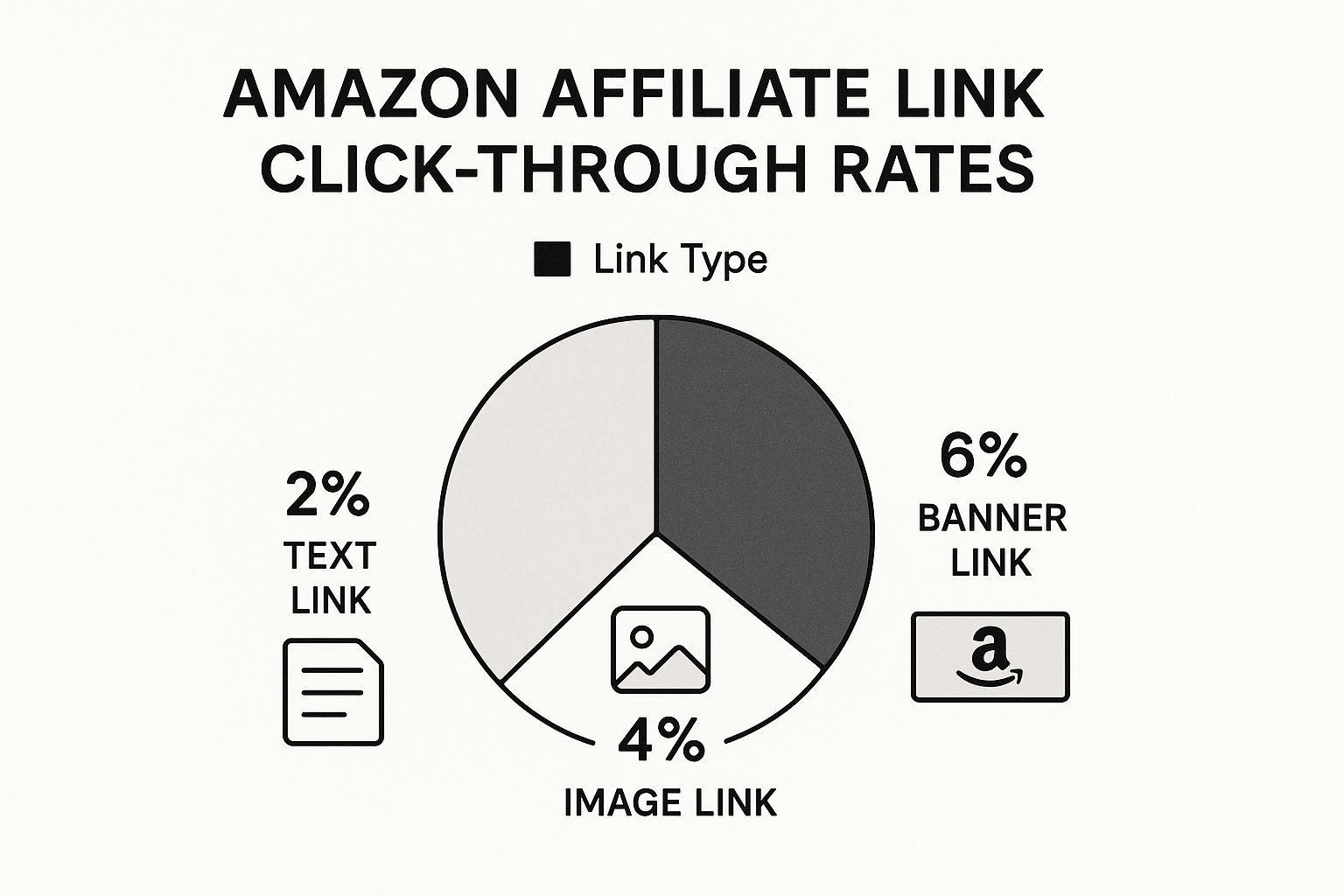
The data here is pretty clear: visual links like banners and images blow simple text links out of the water. It’s a great reminder to think strategically about which link type to use and where.
Unlocking Granular Insights with Custom Tracking
The biggest weakness of a basic affiliate link is that you have no idea how it's really performing. Sure, you might know an article generated a sale, but you don't know which specific link in that article did the heavy lifting. This is where custom tracking parameters, often called sub-IDs, become a game-changer.
Coral lets you add unique identifiers to every link. Let's say you have a winter gear guide. You could create separate, trackable links for the same exact product:
- One link with the sub-ID
winter-guide-top-pickfor the product in your main recommendation box. - Another with
winter-guide-sidebarfor that same product in a sidebar widget. - And a third,
winter-guide-comparison-table, for when it appears in a feature comparison chart.
By adding unique sub-IDs, you move from guessing what works to knowing with certainty. This granular data is the foundation of a sophisticated affiliate strategy, allowing you to optimize every element of your content for maximum revenue.
This simple step unlocks incredibly powerful insights. Your reports will show you exactly which placements are driving sales. You might find that your comparison table converts at a 10% higher rate than your sidebar links. With that knowledge, you can double down on what’s working and tweak what isn't, systematically growing your income over time. You can see how this works in more detail in our guide on https://coral.ax/blog/amazon-attribution-links.
This data-first approach also prepares you for the future of affiliate marketing. We're seeing a huge rise in direct partnerships that offer better commissions than Amazon's standard rates, often from startups and Amazon aggregators. These hybrid campaigns have exploded from around 30,000 in January 2025 to nearly 125,000 by April 2025. With custom tracking, you can walk into those negotiations with hard data, proving your value and securing much better deals.
Choosing the Right Link Generation Strategy
Figuring out the best way to create your Amazon affiliate links really boils down to two things: where you are now and where you want to be. There’s no single "right" way to do it. The best method for you depends entirely on what you're trying to accomplish as a publisher.
Let's break down the trade-offs between simple, manual linking and the power of automation so you can make the right call for your business.
For anyone just starting out, or if you're only managing a handful of links, Amazon's built-in SiteStripe tool is a great starting point. It's free, it's easy, and it works. If you’re just dropping a few product recommendations into a blog post, creating links one by one is perfectly fine.
When to Upgrade to Automation
You'll know it's time to upgrade when link management starts eating into your content creation time. When affiliate marketing goes from a side hustle to a core part of your business, the manual approach starts to break down.
The real cost of doing everything by hand isn't just the hours you lose. It's the growth you miss out on. Automation isn't a luxury; it's what lets you scale your business properly.
If you see yourself in any of these descriptions, it's probably time to look into a tool like Coral:
- You're a Professional Publisher: You're running multiple sites or cranking out high-volume content like holiday gift guides and "best of" lists.
- You Work with a Team: You have other writers and need a single, reliable system to make sure all links are created correctly and tracked in one place.
- You're Focused on Growth: You're serious about maximizing your affiliate income and need detailed tracking data to see what’s actually working.
Building a Scalable Affiliate Business
Switching to an automated platform is really about building a more sustainable and profitable business. The time savings alone are huge—bulk link creation frees you up to write more content. Plus, the improved accuracy means you avoid broken links or tracking errors that cost you commissions.
But the real game-changer is the granular tracking. With custom parameters, you can finally see which links on which pages are driving sales. This kind of insight helps you stop guessing and start making decisions based on real data. That combination of efficiency and data is what allows you to move past the limits of manual linking and build a much stronger affiliate revenue stream.
Frequently Asked Questions
Getting the hang of creating Amazon affiliate links can bring up a lot of questions. Let's walk through some of the most common ones to clear things up and build on what we've already covered.
Can I Make an Affiliate Link for Any Product on Amazon?
Pretty much, yes. Once you're approved for the Amazon Associates program, you can create a link for almost anything sold on the site. You'll see the SiteStripe toolbar pop up on nearly every product page, ready for you to grab a link.
Just keep in mind there are a few exceptions. Things like gift cards and certain subscriptions might not earn you a commission. It's always a good idea to double-check the Associates Program Policies to make sure the products you're promoting are eligible for a cut.
What’s the Big Deal with Using a Tool for Bulk Link Creation?
It all comes down to one thing: saving a massive amount of time. If you've ever built a big "best of" list or a holiday gift guide, you know how tedious it is to create each link one by one. It's hours of mind-numbing, repetitive work.
A tool like Coral automates the entire process. You can feed it a simple list of product URLs or ASINs and get hundreds of correct affiliate links back in minutes.
Think about it this way: that automation frees you up to focus on what actually makes you money—creating great content. The hours you get back can be spent writing, promoting, and fine-tuning your strategy instead of just managing links.
Plus, automation gets rid of human error. No more accidentally pasting the wrong URL or messing up a tracking ID, which ensures every link is set up to earn.
How Exactly Do Custom Tracking IDs Boost My Earnings?
Custom tracking IDs (sometimes called sub-IDs) give you incredibly detailed data about where your clicks and sales are coming from. Instead of just knowing that a certain article generated a sale, you can pinpoint the exact link that did the work. Was it the link in your intro? The big "Buy Now" button? The image in the sidebar?
This level of detail is a game-changer because it lets you make decisions based on real data, not guesswork. Once you see which link placements convert the best, you can replicate that success across your site. This simple, ongoing optimization is one of the most reliable ways to steadily grow your affiliate income.
Ready to stop wasting time on manual link creation and start making smarter, data-driven decisions? With Coral, you can generate hundreds of accurate Amazon affiliate links in minutes, track every click with precision, and unlock the insights you need to scale your earnings. Sign up for Coral today and transform your affiliate workflow.