A Guide to Amazon Shopify Integration
Category: Amazon shopify
Thinking about selling on both Amazon and Shopify? A lot of sellers I talk to treat them like two completely separate businesses, which means double the work. The real magic happens when you stop seeing them as separate battlegrounds and start treating them as a single, powerful ecommerce ecosystem.
The key is to combine Amazon's massive, ready-to-buy audience with the powerful brand-building tools you get from Shopify.
Why Integrate Your Amazon and Shopify Stores

Running your Amazon and Shopify stores without connecting them is like trying to run two different companies at once. You're stuck manually tracking inventory in two places, processing orders separately, and ultimately creating a clunky, disjointed experience for your customers.
Integration isn't just a "nice-to-have"—it solves this headache by turning two distinct channels into one smooth-running sales machine.
The most obvious win right out of the gate is centralized management. Instead of hopping between dashboards, you can handle your inventory, orders, and product details from one spot, usually your Shopify admin. This cuts down on administrative busywork and seriously reduces the chance of simple human error.
Streamline Your Operations
Picture this: you run a flash sale on Amazon, and your bestseller sells out in an hour. Without an integrated system, your Shopify store has no idea and keeps taking orders. Before you know it, you're overselling, dealing with angry customers, and canceling sales. It’s a mess.
With a proper Amazon Shopify connection, your inventory syncs up in near real-time. A sale on one platform automatically adjusts the stock levels on the other. You never have to worry about selling what you don’t have.
This operational harmony also applies to getting your products to customers. It doesn’t matter if you use Fulfillment by Amazon (FBA) or ship from your own warehouse; an integrated setup routes orders where they need to go. You can even set it up to use your FBA inventory to fulfill orders that come through your Shopify store, giving all your customers that fast, reliable shipping they love.
Amplify Your Market Reach
Let's be real about the audience size here. Tapping into Amazon's customer base is a massive lever for growth. The platform completely dominates the U.S. ecommerce market with a 37.6% market share. They spend roughly $1.7 billion on advertising in the U.S. alone to keep that fire hose of traffic pointed their way.
Simply by listing your products on Amazon, you’re putting your brand in front of millions of shoppers who are actively looking to buy something right now. For a deeper look, you can check out more ecommerce statistics.
While Amazon is fantastic for getting new customers, Shopify is where you build your brand. It’s where you own the customer relationship, control the entire experience, and can foster a loyal community that comes back again and again.
A successful strategy uses both: acquire new customers through Amazon's massive marketplace and then nurture long-term loyalty through your branded Shopify experience.
This multi-channel approach is more than just a convenience; it's a genuine competitive advantage. It helps you:
- Boost Product Visibility: Get your products seen by a whole new audience that might never have stumbled upon your standalone store.
- Build Brand Credibility: Having a presence on a trusted platform like Amazon can give a newer brand a stamp of legitimacy.
- Create a Cohesive Experience: You can ensure your branding, pricing, and messaging are consistent across both of your most important sales channels.
Laying the Groundwork for a Smooth Integration

Before you even think about connecting your Amazon and Shopify accounts, a bit of prep work will save you a world of headaches. Trust me on this. Think of it as your pre-flight checklist. Getting these foundational pieces right from the get-go is the difference between a smooth connection and weeks of frustrating troubleshooting.
First things first, you absolutely need an active Amazon Professional Seller account. The individual plan just won’t cut it because it doesn't provide the necessary access for other platforms to talk to Amazon. You'll need the professional plan, which runs $39.99 a month, to unlock the tools required for a real integration.
Make Sure Your Brand Registry is Active
This next one is a biggie. You have to be enrolled in Amazon Brand Registry. I can't stress this enough—it's not just a nice-to-have. It’s the key to protecting your brand from hijackers and, more importantly for our purposes, it unlocks the powerful marketing and tracking tools we're going to set up.
You can double-check your status by logging into the Amazon Brand Services portal. If you can get in and see your brand dashboard, you’re all set.
This is your command center for everything related to your brand on Amazon. Besides giving you control over your listings, Brand Registry is what enables Amazon Attribution, which is absolutely critical for accurately tracking where your affiliate sales are coming from.
Get Your Product Catalogs in Sync
Okay, here is the single most common stumbling block I see people run into: mismatched product data. Your SKUs (Stock Keeping Units) and UPCs (Universal Product Codes) must be identical for the same product on both Amazon and Shopify. There's no room for error here.
Real-World Example: I once worked with a client whose integration was a mess because their Shopify SKU was "Tshirt-Blue-L" while their Amazon SKU was "TS-BL-LG." The software had no idea they were the same item, and their inventory counts were constantly off. It took days to fix.
Save yourself the pain and audit your catalogs now. Export your product lists from both platforms into a spreadsheet and compare them side-by-side. It’s tedious work, but it's far less painful than dealing with sync failures after you've gone live.
Here’s a quick rundown of what you need to have in place before moving on:
- Professional Seller Account: Check that you're on the $39.99/month plan.
- Brand Registry Enrollment: Confirm your trademark is registered and active in Amazon's system.
- Matching SKUs: Every single product variant must have the exact same SKU on both Amazon and Shopify.
- Valid UPCs/EANs: Make sure all your Amazon listings have a valid product identifier; it's a hard requirement for most categories.
Once you can tick all these boxes, you’ve built the solid foundation needed to connect your stores without a hitch.
How To Connect Amazon and Shopify
Alright, with the prep work out of the way, it's time to actually build that bridge between your Amazon and Shopify storefronts. Thankfully, you don't need to be a developer to pull this off.
The most common path is using Shopify's own "Amazon Sales Channel" app, but there are also some seriously powerful third-party tools out there that can give you more advanced features.
Picking Your Integration Method
So, how do you choose? It really boils down to your specific needs.
For a lot of sellers just starting out, the native Shopify app is a great first step. It’s free, and it handles the basics—like syncing inventory and managing orders—without any fuss. But if you’re juggling a massive catalog or need super detailed control over how your data flows, investing in a dedicated connector might be a smart move.
If you're interested in how different platforms connect, Mindstamp offers a good overview of their Shopify integration that can provide some context.
No matter which tool you go with, the core process is pretty similar.
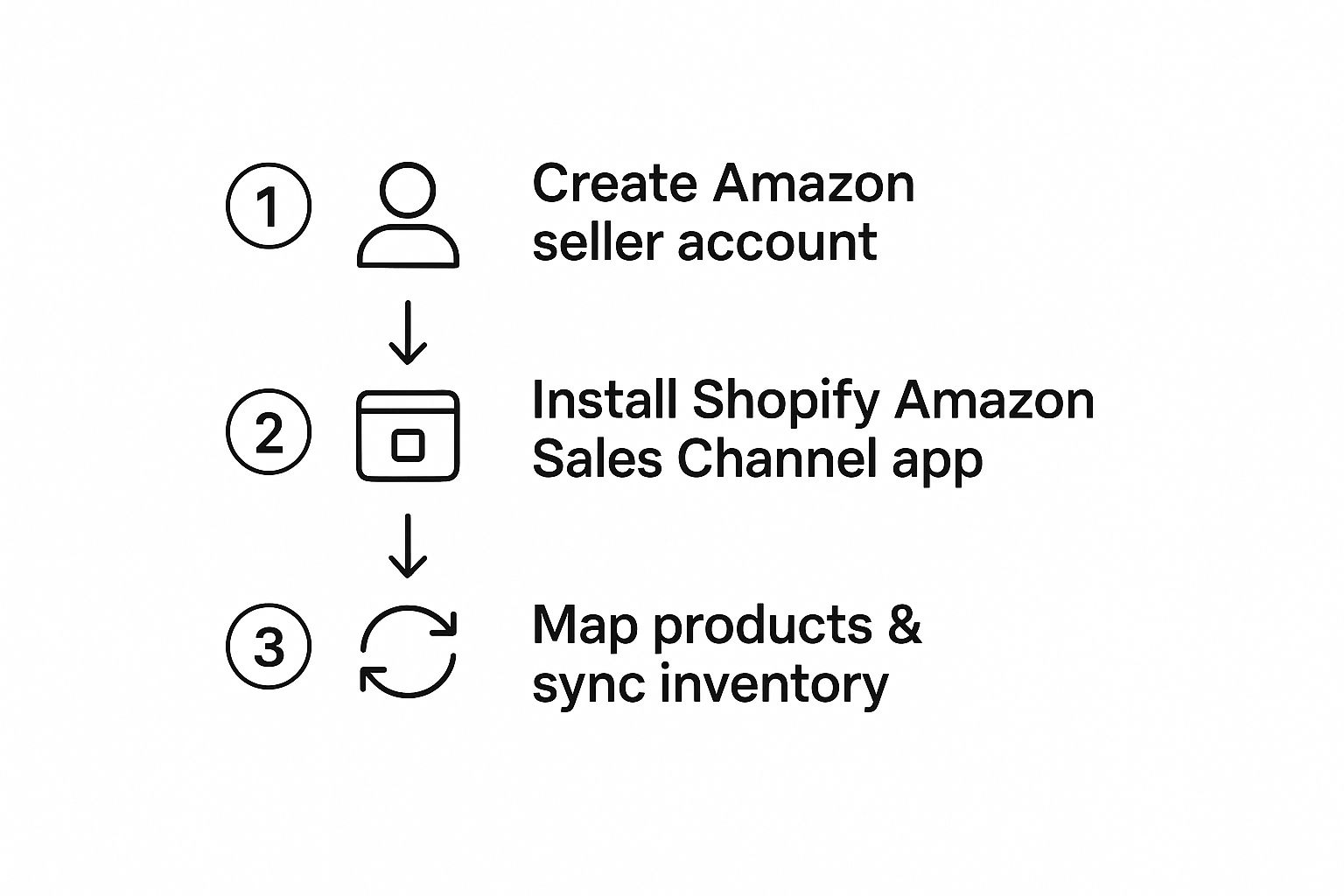
This image really simplifies the journey. You first get your Amazon presence solid, then install the integration app in Shopify, and finally, you link up your products so the two platforms can start talking to each other.
Comparing Amazon Shopify Integration Methods
Choosing the right tool from the start can save you a ton of headaches later. Here's a quick breakdown of the main options to help you decide.
| Method | Key Features | Best For | Potential Cost |
|---|---|---|---|
| Shopify's Amazon Sales Channel App | - Basic inventory syncing - Order management within Shopify - Create new Amazon listings from Shopify |
Sellers new to multi-channel, smaller catalogs, and those looking for a free and simple solution. | Free to install (standard Shopify and Amazon seller fees apply). |
| Third-Party Connector Apps | - Advanced, multi-location inventory rules - Price syncing with complex logic - FBA & FBM order routing |
High-volume sellers, businesses with complex operations, and brands needing granular control over data. | Monthly subscription fees, often ranging from $50 to $500+ depending on features and order volume. |
Ultimately, the native app is perfect for getting your feet wet. But as you grow, don't be surprised if you find yourself needing the more robust features a third-party tool can offer.
Authorizing the Connection and Mapping Products
The first real hands-on task is giving the systems permission to talk. From your Shopify admin, you'll install your chosen app (for this example, we'll use the "Amazon Sales Channel"). It will immediately ask you to sign in to your Amazon Seller Central account. This is the digital handshake that allows Shopify to pull and push data.
Next comes the most important part: mapping your products. This is where all that SKU prep you did earlier becomes a lifesaver. The app will try to automatically match products that have the same SKU on both platforms.
For any products it can't match automatically, you'll need to link them up by hand. It's a bit of a one-time chore, but it's how you tell the system, "Hey, this product on my Shopify store is the exact same thing as this listing on Amazon."
Configuring Your Sync Settings
Once your products are all linked up, you get to define the rules of engagement. This is where you decide exactly how information will sync between the two platforms.
You'll need to decide on a few key settings:
- Inventory Syncing: Do you want your Shopify inventory count to be the single source of truth? Turning this on automatically updates your Amazon stock levels, which is the key to preventing overselling.
- Price Syncing: You can have your Shopify prices automatically update on Amazon. Or, you can manage them separately, which is handy if you want to account for different fees or run platform-specific promotions.
- Order Fulfillment: How will you handle Amazon orders? You can have them sent directly to your Shopify dashboard to fulfill yourself. If you're using FBA, Amazon will handle those orders automatically, and the sync will just keep your records straight.
My best advice? Start small. Pick just a handful of your slower-moving products to test the entire connection. This gives you a safe sandbox to work out any kinks before you risk messing up sales on your bestsellers.
After you've triple-checked that inventory, pricing, and orders are all flowing correctly for your test items, you can go ahead and roll the integration out to your entire catalog. This careful, step-by-step approach is the secret to a smooth, headache-free launch.
Managing Affiliates Across Both Channels

Alright, so your Amazon and Shopify stores are connected, and your inventory is in sync. Now for the fun part: getting people to actually buy your products. Running two separate affiliate programs—one for each platform—is a recipe for headaches. It's confusing for your partners, a pain to manage, and ultimately, it waters down your results.
The real magic happens when you build a single, unified strategy that lets you intelligently direct traffic where it will convert best.
This is where a specialized tool like Coral comes into the picture. It lets you create one cohesive affiliate program that serves both your brand-focused Shopify store and your high-converting Amazon listings. Instead of making affiliates pick a side, you give them flexible tracking links and let them decide what works for their audience.
This simple shift empowers your partners to promote you more effectively, which means better performance for everyone involved.
Crafting a Flexible Affiliate Strategy
Let's play this out with a real-world scenario. Say you're launching a new product. Some of your best affiliates, like the bloggers who write detailed reviews or the YouTubers who create in-depth videos, might want to send their audience straight to your Shopify store. It's the perfect place for them to tell a richer brand story, and you can often offer them a more attractive commission.
On the flip side, you've got affiliates who live on TikTok or Instagram. Their audience is all about impulse buys. For them, sending traffic directly to your Amazon page is a no-brainer. That familiar "Buy Now" button is a powerful conversion tool, and they know their followers won't hesitate.
A unified system handles both of these situations without you lifting a finger. You just provide the links, and your affiliates do what they do best—optimize their own campaigns.
Stop thinking in terms of an "Amazon affiliate program" versus a "Shopify affiliate program." What you're really building is one central growth engine for your brand that just happens to leverage the unique strengths of each sales channel.
This flexible approach is honestly the key to getting the best possible return from your affiliate marketing efforts.
Centralizing Your Affiliate Management
Trying to manage this hybrid model with spreadsheets is just not going to work. You need a dedicated platform to act as the central hub where you can bring affiliates on board, set commission rates, and see how everything is performing across both channels.
Here’s what a centralized system actually gives you:
- A Single Point of Entry: Affiliates sign up once to promote your brand, not just a specific storefront.
- Customizable Commissions: You can easily set different commission structures for Amazon and Shopify sales. You could even offer a VIP rate for your top-performing partners.
- Crystal-Clear Tracking: Both you and your affiliates see all the clicks, conversions, and earnings in one dashboard, no matter where the sale happened.
- Painless Payouts: Manage all your affiliate payments in one place. No more trying to reconcile reports from two completely different systems.
For example, using a tool like Coral, an affiliate can grab an Amazon Attribution link for an Instagram Story and then generate a standard Shopify affiliate link for their blog post, all from the same portal. If you're new to this, our guide on how the Amazon affiliate system works for brands breaks down the mechanics in more detail.
This level of control and transparency makes your program incredibly attractive to the high-quality creators you want to work with. They get the flexibility they need to succeed, and you get a clean, consolidated view of how your affiliate program is growing your entire Amazon Shopify ecosystem. It takes a complex, multi-channel problem and turns it into a streamlined and powerful part of your business.
Optimizing Your Multi-Channel Sales Strategy
https://www.youtube.com/embed/0NOER-Lle-0
Now that your stores are connected, the real fun begins. It's time to build a smart sales machine that doesn't just sync data but actually makes your Amazon and Shopify channels work in concert. Think of it this way: each platform has its own superpower, and your job is to use them together.
Let Amazon be your customer acquisition engine. Its massive audience is already primed to buy, making it the perfect place to get your products in front of fresh eyes. At the same time, your Shopify store is your brand's home base—the place where you build community and nurture lasting relationships with customers.
Using Data to Drive Decisions
To make this dual-channel strategy really hum, you have to get comfortable with the data from both platforms. Don't just glance at the top-line sales figures. You need to dig in and understand who is buying what, and where.
You might find that one of your product lines flies off the shelves on Amazon with first-time buyers, but your repeat customers almost always come back to your Shopify store to buy it again, maybe to cash in on loyalty points. That kind of insight is pure gold. It tells you precisely where to point your marketing dollars.
Try running promotions that play to each platform’s strengths:
- On Amazon: Leverage things like Lightning Deals or coupons to attract new eyeballs and give your sales velocity a nice jolt. It’s all about visibility here.
- On Shopify: Offer exclusive bundles or early access to new drops for your email list. This is how you reward your fans and keep them coming back to your site.
Creating a Unified Customer Experience
One of the biggest pitfalls of selling on multiple channels is creating a fractured experience for the customer. Someone who discovers your brand on Amazon should feel that same vibe and see that same brand promise when they land on your Shopify site. Consistency is everything; it’s what builds the trust needed to turn a one-time Amazon sale into a long-term brand advocate.
A key piece of this is having an effective omnichannel messaging strategy. Your support team should be ready to help a customer whether they bought on Amazon or your site, creating a seamless and positive interaction every single time.
Your goal is to guide customers on a journey. They might discover you on Amazon, but your packaging, follow-up emails, and social media should all gently nudge them toward the richer brand experience waiting for them on your Shopify store.
This integrated approach is non-negotiable in today’s e-commerce world. With over 4.8 million active stores worldwide, Shopify has proven itself as a titan of brand-building. By marrying its strengths with Amazon's incredible reach, you create a powerful and complete sales ecosystem. For more ideas on driving traffic between your channels, check out our guide on ecommerce affiliate marketing.
Got Questions About Integrating Amazon and Shopify?
Even with a perfect plan, you're bound to hit a few snags when connecting your Amazon and Shopify stores. It happens to everyone. Let's walk through some of the most common questions and roadblocks I see sellers run into, so you can sidestep them entirely.
"Will My Inventory Actually Sync?"
This is probably the #1 concern people have. Can you really trust an app to keep your stock levels in sync across both platforms automatically?
Absolutely. Modern integration tools, like Shopify’s own Amazon Sales Channel app, are built specifically for this. The moment a product sells on Amazon, the app instantly updates your Shopify inventory, and vice-versa.
This is your secret weapon against overselling. But there’s a catch: it only works if your product SKUs are an exact match on both Amazon and Shopify. Even a tiny difference in a SKU will break the sync for that specific item, so double-check that your data is clean before you connect everything.
"How Do I Handle Returns from Different Channels?"
Returns are another big question mark for many sellers. The process can feel messy, but the rule is actually pretty straightforward: wherever the order was fulfilled is where the return gets handled.
- Fulfillment by Amazon (FBA) Orders: If Amazon picked, packed, and shipped it, they also manage the return. The customer deals directly with Amazon, and you won’t have to do a thing in your Shopify dashboard.
- Fulfilled by Merchant (FBM) Orders: When you ship an order yourself (whether it came from Amazon or Shopify), the return comes back to you. It will follow the return policy you've set up for your own store.
The key is to have your return policies clearly stated on both storefronts. You don't want a customer who bought on Amazon to be confused about how to send something back.
"Is Amazon Brand Registry Really That Important?"
I get this one a lot. Technically, you can connect a standard Amazon seller account to Shopify. But honestly, trying to build a serious brand without Brand Registry is like trying to drive a car with no steering wheel.
Brand Registry is what gives you ironclad control over your product listings and protects your brand from hijackers and counterfeiters.
More importantly for our purposes, Brand Registry is the key that unlocks Amazon Attribution. This is the technology that makes sophisticated affiliate tracking possible. Without it, you have no real way of knowing which marketing partners are actually driving sales on Amazon.
If you're serious about growing a brand on both platforms, think of Brand Registry as non-negotiable. For a deeper look into how this tracking works, check out our guide to the Amazon affiliate marketing program for brands. Getting these foundational pieces right from the start will save you a world of headaches later on.
Ready to bring your Amazon and Shopify affiliate programs under one roof? Coral is the central hub for recruiting, tracking, and paying your partners, no matter where they send customers. Start for free with Coral and finally unify your multi-channel marketing.