How to Become an Amazon Affiliate: A Step-by-Step Guide for 2024
Category: How to become a amazon affiliate
Dipping your toes into affiliate marketing can seem like a huge undertaking, but signing up as an Amazon affiliate is one of the smartest first moves you can make. The basic idea is simple: you apply for the Amazon Associates program, get your website or social media account approved, and start sharing special product links. When people buy through your links, you earn a cut. It’s a straightforward way to start making money from your content.
This guide will walk you through the entire onboarding process, from application to sharing your first link. We'll show you how to get approved and how using a smart tool like Coral from day one can simplify your journey and help you earn your first commission faster.
Your Guide to Becoming an Amazon Affiliate
The Amazon Associates program isn't just another affiliate network; it's a giant in the e-commerce world. It’s actually the biggest affiliate program out there, holding a massive 46.21% of the market share. That’s a huge piece of the pie, and it shows just how much trust creators and brands put into the platform.
Getting started is as simple as filling out an application, but the real work begins once you're approved. You'll need to create links, keep an eye on what's performing well, and figure out what your audience actually wants to buy.
This is exactly where a tool like Coral comes in handy right from the beginning. Instead of getting bogged down in messy spreadsheets or trying to make sense of complicated dashboards, Coral gives you one clean, central place to manage all your affiliate links and partnerships. It’s built to take you from sign-up to your first dollar earned, without the usual headaches.
To help you get ready, here's a quick checklist of what you'll need before you apply. Getting these things in order first will make the whole process much smoother.
Amazon Affiliate Onboarding Checklist
| Requirement | Why It's Important | Action Step |
|---|---|---|
| A Live Website or Social Profile | Amazon needs to see that you have an established audience and high-quality, original content. | Ensure your site is live with at least 10-15 quality posts, or your social profile has consistent, recent activity. |
| A Niche/Topic | A clear focus helps attract a dedicated audience and makes your product recommendations more authentic and effective. | Define your target audience and the specific topics you'll cover. Are you a tech reviewer? A home cook? A fashion blogger? |
| An "About" and "Contact" Page | These pages build trust with both your audience and Amazon by showing you're a real, credible person or business. | Create clear and easy-to-find pages that explain who you are and how you can be reached. |
| A Privacy Policy | This is often a legal requirement and shows you handle user data responsibly. | Add a basic privacy policy to your website. You can find many free templates online to get started. |
Having these fundamentals in place shows Amazon you're serious and professional, which can significantly improve your chances of getting approved quickly.
As you get started, it helps to see the bigger picture of how content creators turn their passion into income. For a fantastic deep dive, check out this guide on how to earn money blogging. And if you need a little inspiration for what a successful site looks like, we've put together a collection of great Amazon affiliate website examples to show you what's possible.
Step 1: Tackling the Amazon Associates Application
Alright, let's get down to business. Your first real move to become an Amazon affiliate is filling out the application on the Associates website. Don't just see this as another online form; it's your chance to make a solid first impression with Amazon and show them you're a serious potential partner.
To get started, head over to the official Amazon Associates homepage and hit that "Sign Up" button. You’ll be guided through a few pages where you'll need to plug in your account info, share the websites or social media pages you plan to use, and give them the lowdown on your niche.
This graphic breaks down the whole sign-up process visually.
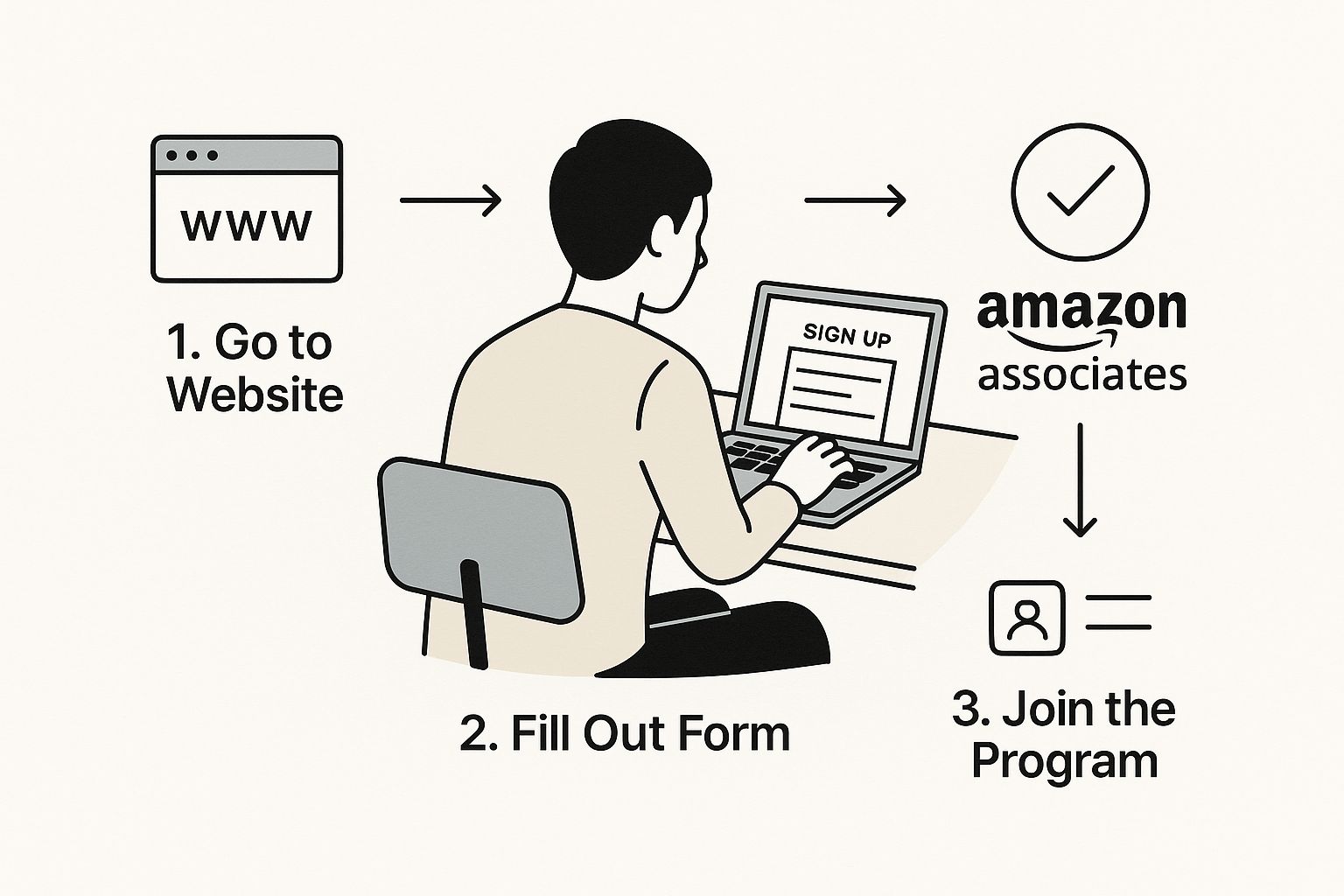
As you can see, if you have your information ready to go, it's a pretty straightforward process.
The Details Amazon Cares About
When you're filling out your profile, precision matters. Amazon needs to get a clear picture of who you are, what your content is about, and who you're talking to.
- Your Websites & Social Links: Give them direct links to your active platforms. A huge red flag for Amazon is linking to an "under construction" page or using a URL shortener—it's a quick way to get your application tossed.
- Associates Store ID: Pick an ID that's short and makes sense for your brand. This little snippet of text will be in every affiliate link you create, so you want it to be instantly recognizable to your audience (and you!).
- How You Describe Your Content: Be crystal clear about what your site or channel does. Instead of something generic, try: "My blog, 'The Gadget Guru,' offers deep-dive reviews and tutorials on the latest consumer electronics for a tech-focused audience."
My two cents: Treat this application like a job interview. A professional, well-thought-out submission tells Amazon you mean business and dramatically boosts your chances of getting approved without a hitch.
Once you submit your application, the next step is getting approved and preparing to earn. A tool like Coral is designed to simplify this entire journey. It helps you organize your affiliate strategy from the very beginning, making the transition from application to your first commission incredibly smooth.
If you want to get a leg up, check out these practical affiliate marketing tips or dive into our foundational guide on how to start affiliate marketing.
Step 2: Getting Your Account Approved
Hitting "submit" on your application is easy, but getting approved is another story. Amazon's review team is looking for one thing: proof that you're a legitimate content creator with an audience. They want to see you've put in the work before asking to join their program.
Think of it from their perspective. A brand-new blog with only a handful of posts looks like a risk. Before you even fill out the form, make sure your website or social media presence is active, established, and packed with original content.
What Amazon Looks for in an Applicant
The approval process isn't a black box. The Amazon team focuses on a few key areas to make sure you'll be a good partner—someone who represents their brand well and can actually drive sales.
Here are our top tips for getting approved:
- Sufficient Original Content: You need a solid base of content. I usually recommend having at least 10-15 high-quality, original posts on your site. This shows you're serious.
- A Real, Engaged Audience: They need to see that real people are visiting your site or following you. Consistent traffic and engagement tell them your recommendations will actually be seen.
- A Professional Website: Your site has to be live and fully functional. Broken links, half-finished pages, or "coming soon" banners are instant deal-breakers.
One of the biggest things new affiliates miss is that your approval is only temporary at first. You have to make three qualifying sales within 180 days to make it permanent. This is their way of weeding out inactive accounts.
Staying Compliant and Making Those First Sales
Once you get that initial green light, the pressure is on. You need to create content that not only makes sales but also follows Amazon's rules to the letter. This means having a clear affiliate disclosure on every page with links, letting visitors know you might earn a commission.
This is where a tool like Coral becomes essential. Instead of just throwing links at the wall and hoping something sticks, Coral helps you get organized from the very beginning. You can track all your clicks and sales in one place, which makes it incredibly easy to see what's working with your audience.
That way, you can double down on what resonates and hit that three-sale requirement much faster, setting yourself up for long-term success right from the start.
Step 3: Sharing Your First Amazon Affiliate Link
Alright, you're officially in the Amazon Associates program. Congratulations! Now for the fun part: making some money. Your first step is to grab an affiliate link and get it out into the world.
Amazon has a handy tool called SiteStripe that makes this incredibly easy. Once you’re logged into your Associates account, you'll see a gray bar appear at the very top of every single Amazon page. It’s your new best friend.
Just head over to a product page you want to promote, and you can create a unique, trackable link right there on the spot.
Using Amazon SiteStripe
Think of SiteStripe as your personal link-generating command center. No more clicking back and forth to your main dashboard; you can create everything you need directly from a product listing.
Here’s a quick rundown of your options:
- Text Links: This is your bread and butter. Click the "Text" button on the SiteStripe bar, and Amazon spits out a short URL. It’s perfect for dropping into blog posts, social media updates, or newsletters. Simple and effective.
- Image Links: People love visuals. If you want to use the actual product image, just click "Image." Amazon gives you a snippet of HTML code that embeds a clickable picture of the item right onto your site.
- Text + Image: This is a nice little package deal. You get a widget with the product's image, its name, the current price, and a "Buy Now" button. It’s a fantastic call-to-action to place in your website's sidebar or within a review.
As you get the hang of creating links, it's also a good time to understand what a conversion is in marketing. After all, the goal is to turn those clicks into actual sales.
Simplifying Your Workflow from Day One
Making one link is a breeze. Making ten is manageable. But when you start dealing with dozens—or even hundreds—of links across multiple articles, things get messy fast. A spreadsheet can only take you so far.
This is exactly why a tool like Coral is a game-changer, even when you're just starting out. It gives you a clean, centralized dashboard to manage everything.
Coral simplifies the entire journey from application to first commission. You can organize your partnerships, track link performance, and see your earnings grow, all in one place.
Let's say you recommend a new kitchen gadget in a blog post. You generate the link, then use Coral to see how many people are clicking and buying. This instant feedback loop is gold—it tells you what your audience actually wants, so you can double down on what works. It’s the smart way to build a scalable affiliate business from the ground up.
For a more detailed look, we’ve put together a complete guide on https://coral.ax/blog/how-to-get-amazon-affiliate-link.
Maximize Your Revenue with Brand Partnerships
Standard Amazon commissions are a decent starting point, but if you stop there, you're leaving a lot of money on the table. The real opportunity for affiliates lies in partnering directly with brands through Amazon's Creator Connections program.
This program is a total game-changer. It lets you team up with brands selling on Amazon to earn much higher, "supercharged" commissions. Think about it this way: instead of the standard 3% from Amazon, a brand might offer you an extra 12% to feature their product. All of a sudden, your total commission on that one sale jumps from 3% to a whopping 15%. That's how you really scale your income.
Finding and Applying for Partnerships
Creator Connections is your ticket to turning a side hustle into a serious business. You're no longer just earning from standard affiliate links; you're building direct, more profitable relationships with the brands your audience already loves.
And brands are catching on fast. The number of active campaigns on the platform exploded from around 30,000 in January to about 125,000 by April. This isn't a small trend; it's a fundamental shift in how creators and brands collaborate on Amazon.
The old model of relying solely on standard affiliate rates is quickly becoming outdated. Direct partnerships are the future, rewarding top-tier affiliates with commissions that genuinely reflect the value they bring.
Getting started is pretty straightforward. You just browse the available brand campaigns right inside your Associates dashboard, apply to the ones that are a good fit for your audience, and wait for the brand to approve you. We've got a full breakdown of the process in our guide explaining what is Amazon Creator Connections.
As you start landing these deals, you'll quickly realize that managing them can get messy. This is where a tool like Coral becomes invaluable. Instead of trying to track conversations, links, and payments across spreadsheets and emails, Coral gives you a single dashboard to organize all your brand partnerships, see how your campaigns are performing, and watch those supercharged earnings roll in.
Have Questions About Becoming an Amazon Affiliate?
Diving into the world of Amazon affiliate marketing always sparks a few questions. I've been there. Let's walk through some of the most common things people ask so you can get started with confidence.
Getting Started: Requirements and Rules
One of the biggest questions I hear is about traffic. Do you need a huge audience to get approved? The short answer is no. Amazon doesn't have a magic number for pageviews, but they do want to see that you've built something real.
This means your website, YouTube channel, or social media page needs to have original, quality content and look like you're actively working on it. My advice? Get your platform looking professional before you even think about hitting that apply button.
How (and When) You Get Paid
Naturally, everyone wants to know about the money. Amazon pays out commissions about 60 days after the end of the month you earned them. So, if you earn a commission in January, you can expect to see that cash around the end of March.
You'll also need to hit a $10 minimum threshold before they send a payment, which you can receive via direct deposit or an Amazon gift card.
What if you don't have a traditional website? That's perfectly fine. You can absolutely succeed as an Amazon affiliate using platforms like Instagram, TikTok, or YouTube. Just be sure to list your social media profile URLs when the application asks for your websites.
It's also worth looking into the Amazon Influencer Program. It's a slightly different beast, but the commission rates can be fantastic, ranging from 1% all the way up to 20%. For example, promoting Amazon Games can net you that top-tier 20% rate. Plus, having a dedicated influencer storefront is a proven way to boost your conversion rates. You can find some pretty interesting stats about the influencer program's effectiveness on amraandelma.com.
My Two Cents: Don't obsess over follower counts when you're starting out. Focus on creating genuinely helpful content that builds a real community. Once you have an engaged audience, the affiliate income becomes a natural next step.
From filling out that initial application to seeing your first commission land in your bank account, the whole journey is just a series of small, achievable steps. And having the right tool to manage it all makes a world of difference.
That's where a platform like Coral comes in. It gives you one central place to manage all your affiliate links and brand deals right from the start. Forget about messy spreadsheets—you get a clean dashboard that shows you what’s working, helping you turn your passion into a real business.