Master PPC on Amazon: Proven Strategies for Success
Category: Ppc on amazon
Amazon PPC is a beast of an advertising platform. It lets sellers get their products right in front of shoppers who are ready to buy, placing them at the top of search results and on competitor product pages. Since you only pay when someone actually clicks your ad, it's one of the most direct ways to generate traffic and, more importantly, sales.
But here’s the thing: real success with PPC on Amazon starts long before you ever spend a dime on an ad.
Building Your Foundation for Amazon PPC Success
 Jumping into bidding on keywords without doing the prep work is like trying to build a house on a shaky foundation. It doesn't matter how brilliant your ad strategy is; without a solid base, the whole thing will eventually crumble. This groundwork isn't about campaign settings or bidding—it's about making sure your product is "retail-ready." You want every single click you pay for to have the absolute best chance of turning into a sale.
Think of your product listing as your landing page. Your ad's job is to get the customer to the door, but a weak, unconvincing listing will send them running. That’s why a polished product detail page is your single most important asset for PPC on Amazon.
Optimize Your Product Listing First
Before you even think about launching a campaign, get your listing in order. A retail-ready page is a non-negotiable, and it must include:
- Top-Notch Imagery: Your photos and videos are your virtual sales pitch. Use multiple high-resolution images showing the product from all angles, in use, and highlighting its best features.
- Persuasive Copy: Your title, bullet points, and description need to be packed with the keywords shoppers are using, but they also have to be compelling. You're trying to answer a customer's questions before they even think to ask them.
- A+ Content: If you have Brand Registry, A+ Content is your best friend. It allows you to tell a richer brand story and dive deeper into product features, which builds trust and boosts conversion.
This prep work directly affects your ad performance. The average conversion rate for Amazon ads hovers around a whopping 10.33%. Compare that to the paltry 1.33% you see on other e-commerce platforms, and it’s clear Amazon shoppers are there to buy. A poorly optimized listing is the fastest way to lose that sale.
Define Clear and Measurable Goals
What are you actually trying to accomplish with your ads? Without a clear goal, you're just throwing money into the wind. Your objectives will shape your entire strategy, from how you structure your campaigns to the bids you set.
If you’re new to the advertising game, it’s worth getting a handle on the basics first. This beginner's guide to digital marketing offers some great foundational knowledge.
For PPC on Amazon, your goals will likely fall into one of these buckets:
- Profitability: This is the endgame for most established products. You want to generate sales while keeping your ad spend low enough to maintain a healthy profit margin.
- Product Launch: When you're launching a new product, the goal is often just to get the ball rolling. You need sales velocity and reviews, even if it means breaking even or taking a small loss on ad spend initially.
- Brand Awareness: Sometimes, the mission is simply to get your brand and products in front of as many relevant shoppers as possible to build recognition.
Key Takeaway: Your goal is directly tied to your target Advertising Cost of Sale (ACoS). A profitability campaign demands a low ACoS, while you can afford a much higher ACoS for a launch campaign where the focus is on growth.
How to Structure Your Amazon Ad Campaigns
A messy campaign structure is one of the fastest ways to burn through your advertising budget. I've seen it happen time and time again. Without a clear plan, you end up with overlapping keywords, confusing performance data, and no real way to scale what's working.
Getting your structure right from the start gives you clarity, control, and a solid foundation for profitable growth. It all begins with understanding the different tools—or ad types—Amazon gives you to work with.
This infographic gives you a bird's-eye view of how the different pieces fit together.
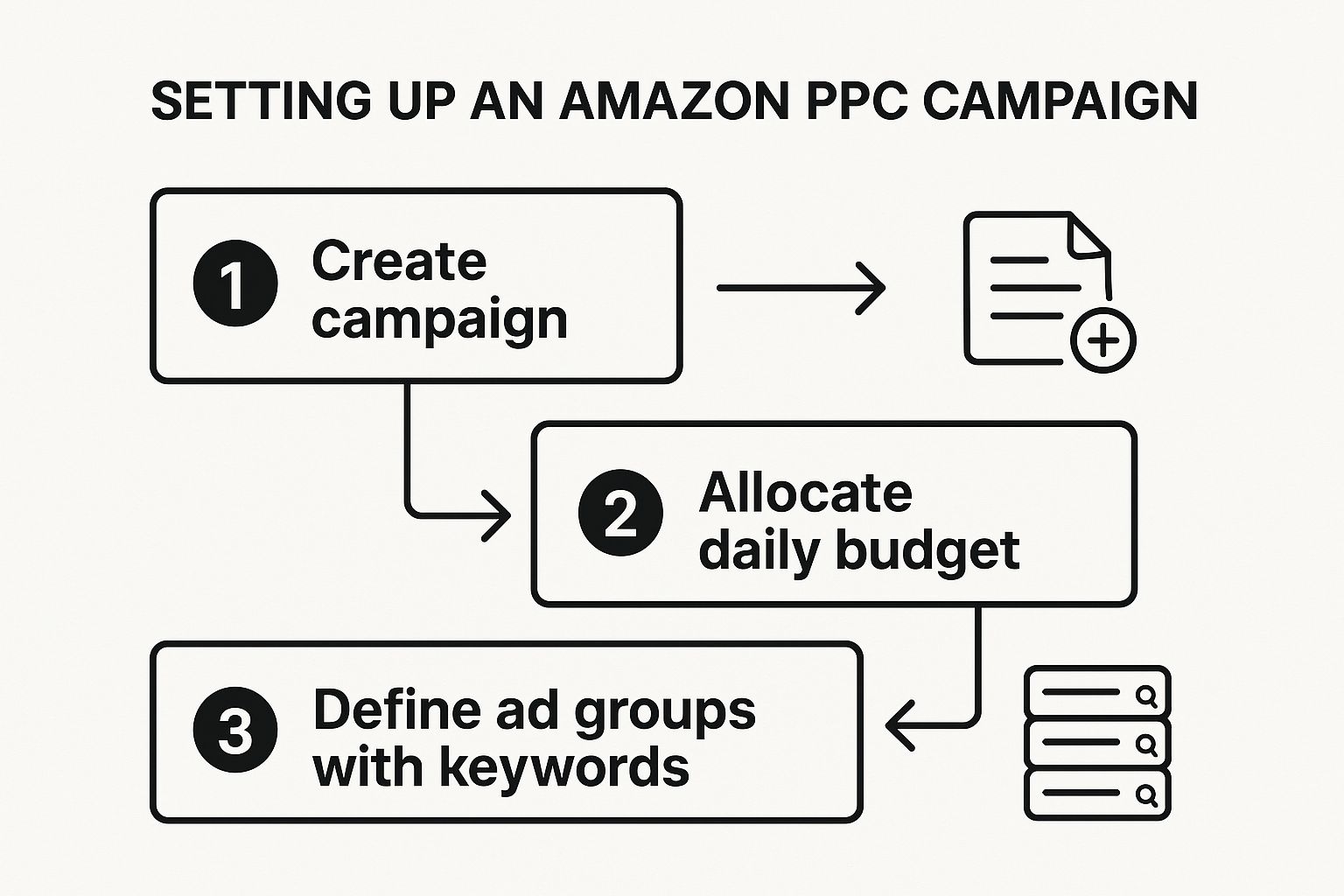
Think of it this way: your campaigns are the filing cabinets, the ad groups are the folders inside, and your keywords and ads are the documents. A good system keeps everything organized.
The Main Amazon Ad Types
Amazon gives us three core ad types, and each one has a specific job to do. Knowing when to deploy each one is a huge part of the game.
To make it easier to decide, here’s a quick-reference table that breaks down what each ad type is best for.
Amazon Ad Type Comparison
| Ad Type | Best For | Placement | Typical Goal |
|---|---|---|---|
| Sponsored Products | Driving sales for specific products | Search results & product pages | Immediate sales & ranking |
| Sponsored Brands | Building brand awareness & authority | Top of search results (banner) | Brand recognition & traffic to Storefront |
| Sponsored Display | Retargeting interested shoppers | On and off Amazon (websites/apps) | Re-engagement & staying top-of-mind |
As you can see, you wouldn't use a Sponsored Brand ad if your only goal was to sell one specific product quickly—that's a job for Sponsored Products. Choosing the right tool for the job is half the battle.
For a much deeper dive into the nuances of these ad types, our comprehensive guide on PPC for Amazon is a great resource.
A Proven Campaign Structure Walkthrough
Let's get practical. Imagine you're launching a new product: a set of premium silicone baking mats. Your goal is to find out which keywords actually make you money and then scale up. The best way to do this is with what we call an "Auto-to-Manual" structure.
The idea is simple. You use an automatic campaign as your research lab to discover the exact search terms customers are using to find and buy your product. Then, you take those proven, high-converting keywords and move them into a manual campaign where you can control your bids with surgical precision.
Here’s how you’d set it up:
- Launch an Automatic "Discovery" Campaign: First, create a Sponsored Products automatic campaign just for your silicone baking mats. Give it a modest daily budget to start—maybe $15-$20. Let Amazon's algorithm do the initial work of matching your product to customer searches.
- Harvest the Search Term Report: Let the campaign run for at least two to four weeks. Then, it's time to dig into your Search Term Report. This report is pure gold. It shows you every single phrase a shopper typed before clicking your ad. You’ll find broad terms ("baking supplies"), highly relevant terms ("silicone baking mat"), and even competitor brand names.
- Find Your Winners and Losers: Sift through the data. You're looking for search terms that have generated at least one sale—these are your "winners." At the same time, look for totally irrelevant terms that are just wasting your money, like "silicone phone case."
My Two Cents: Don't jump to conclusions after just a few days. Amazon's attribution can take up to 14 days, so a click on Monday might not show up as a sale until the following week. Good data requires patience.
Once you have this list of proven keywords, you’re ready to take control.
Building Your Manual Campaigns
This is where you start driving real profitability. You'll use the data you just uncovered to build highly targeted manual campaigns.
- Create a Manual "Winners" Campaign: Start a brand new Sponsored Products manual campaign. Inside it, create ad groups for your winning keywords. For our baking mat example, you would take a term like "non stick baking mat" and add it as an exact match keyword.
- Bid with Confidence: Since you already know this keyword converts, you can be more aggressive with your bid to fight for a top ad spot. This is how you start to dominate the search results for your most valuable terms.
- Stop the Cannibalization: This next step is critical. Go back into your original automatic campaign and add "non stick baking mat" as a negative exact match. This action tells the auto campaign to stop bidding on that term, forcing all future traffic for it through your new, highly optimized manual campaign. It prevents your own campaigns from bidding against each other and muddying your data.
This methodical structure creates a clean, repeatable system. Your auto campaign constantly feeds you new customer search terms, while your manual campaigns let you double down on what’s already proven to work.
Finding Keywords That Actually Convert
Let's talk about keywords. They’re the foundation of any good Amazon PPC campaign. It's easy to just brainstorm a list of terms you think customers will use, but the real money is in finding the exact phrases people type in right before they click "buy." This is where we stop guessing and start using data.
Your automatic campaigns are your best friend here. Don't just see them as a way to get some early sales; think of them as your secret research department. They listen to what real shoppers are searching for and hand you a list of their exact words.
Digging for Gold in Your Search Term Report
This is where the magic happens. The Search Term Report, tucked away in your advertising console, is a direct feed from the minds of your customers. It shows you every single search query that triggered your ad and got a click.
Before you dive in, make sure your campaign has run for at least two to four weeks. Anything less, and you're just looking at noise, not trends. Once you have that solid chunk of data, it’s time to start panning for gold and tossing out the rocks.
Spotting the Winners
As you scan the report, you're on the hunt for patterns. You want to pinpoint any search term that has led to at least one sale with an Advertising Cost of Sale (ACoS) you can live with. These are your proven winners.
You’ll generally find a few different types of valuable terms:
- Super-Specific Long-Tail Keywords: Think phrases like “BPA-free silicone baking mat for macarons.” The search volume is low, but the person searching knows exactly what they want. Conversion rates on these can be incredible.
- Broader, Relevant Terms: Something like “baking sheet liner” might have a higher ACoS, but it can also bring in a ton of sales. These are workhorses for your campaign, but you'll need to watch your bids closely.
- Your Competitors' Names: It’s not uncommon to see sales come from shoppers who searched for a rival brand. This can be a fantastic, if sometimes pricey, way to steal a bit of their market share.
My Two Cents: Don't get tunnel vision on sales alone. If you see a term with a great Click-Through Rate (CTR) but zero conversions, pay attention. It means your ad is compelling, but your product page isn't sealing the deal for that specific search. That’s a huge clue that you might need to adjust your listing's copy or images.
Spying on the Competition with External Tools
Your own data is crucial, but you can get a serious leg up by peeking at what your competitors are doing. Tools like Helium 10 or Jungle Scout have "reverse ASIN" features that are pure gold. You can plug in a competitor's product and see the keywords they're ranking for and bidding on.
Using some of the best competitive intelligence tools is a game-changer. They often uncover keyword opportunities you’d never find just by looking at your own reports, letting you build a much stronger, more complete keyword list right from the start.
The Power of Saying "No" with Negative Keywords
Finding what works is only half the battle. You also have to aggressively cut out what doesn’t. That's where negative keywords come in. Think of them as the bouncers for your ad budget, turning away irrelevant searches that just waste your money.
Your Search Term Report is the perfect place to find these. For example, if you sell high-end glass food containers, you definitely don't want to be paying for clicks from someone searching for "cheap plastic food containers." By adding "plastic" as a negative keyword, you stop that money drain instantly.
You have two main weapons here:
- Negative Phrase Match: This blocks your ad anytime that specific phrase appears in a search. Adding "plastic" as a negative phrase would block searches for "cheap plastic containers" and "BPA plastic containers." It's your broadsword.
- Negative Exact Match: This only blocks the exact search term. This is your scalpel, perfect for blocking very specific but irrelevant searches, like a competitor's model number that has nothing to do with your product.
This whole process—finding winners in your Search Term Report, adding them to your manual campaigns, and blocking the losers with negative keywords—isn't a one-time task. It’s a constant cycle of refining and optimizing. This is the core work that turns a so-so campaign into a profit-printing machine.
Getting Smart with Bids and Budgets
This is where the rubber meets the road. You can have the best campaign structure in the world, but if your bidding and budget management are off, you’re either burning cash or leaving sales on the table. It’s all about making your ad spend work smarter for you.
And it's getting more important every year. The cost to play on Amazon keeps climbing. In 2025, the average cost-per-click (CPC) is sitting around $0.98. In hot categories, you can easily see that number blow past $1.50. This isn't just a small bump; it's a clear signal that every single click needs to count.
Choosing Your Bidding Strategy
Amazon offers three main ways to bid, and picking the right one is all about matching it to what you're trying to accomplish with a specific campaign. They each have a very different purpose.
Dynamic Bids - Down Only: Think of this as your "safe mode." Amazon will only ever lower your bid if it thinks a click isn't likely to lead to a sale. I always use this for my steady, mature campaigns where the goal is just to maintain consistent, profitable sales without taking any big risks.
Dynamic Bids - Up and Down: This is the one you pull out when you need to get aggressive. Amazon has permission to jack up your bid by as much as 100% to get you to the top of the search results. It’s perfect for a product launch or a big push during Prime Day when you absolutely need eyeballs, even if it means your ACoS takes a temporary hit.
Fixed Bids: This option gives you full manual control, but it also means you're flying the plane yourself. Amazon won't adjust your bid at all. This is really for seasoned sellers who have a ton of data and are confident in their ability to set the perfect bid for a keyword without Amazon's help.
If you want to go a layer deeper on the pros and cons of each, our complete guide to Amazon PPC marketing is a great resource.
How to Set Your First Bids and Budgets
So, you're launching a new campaign. What's the magic number for your bid?
A solid place to start is with Amazon's "suggested bid." It shows you a range based on what your competitors are bidding. Don't just pick the highest or lowest number—aim for somewhere in the middle. You can always adjust later.
Your break-even ACoS (Advertising Cost of Sale) is your true guide. If your profit margin allows for a 30% ACoS to break even, your bids and conversion rate need to work together to stay under that number.
My Two Cents: Don't choke your campaigns with a tiny daily budget. Anything under $10-$15 a day will probably run out before lunch. You'll never get a clear picture of performance because you're missing out on afternoon and evening shoppers. You need a full day of data to make good decisions.
Put Your Budget on Autopilot for Peak Times
One of the most valuable tools hiding in plain sight is Campaign Budget Rules. This little feature lets you schedule budget increases for specific days or events. It’s a game-changer for capturing sales during predictable traffic spikes.
Let’s say you sell grilling tools. You know for a fact that sales pop off every single weekend. Instead of remembering to log in every Friday to raise your budgets and every Monday to lower them, you can automate it.
Here’s how you'd set it up:
- Rule Name: Weekend Grilling Rush
- Date Range: Recurring every Saturday & Sunday
- Budget Increase: Bump it up by 50%
That’s it. Now your ads will stay competitive all weekend long without you having to lift a finger. It’s a simple, set-it-and-forget-it tactic that ensures you’re always ready for your busiest shopping windows.
Fine-Tuning Your Campaigns for a Better ROI

Getting your first PPC campaigns live is a great start, but it’s just the beginning. The real money in Amazon PPC is made in the adjustments and refinements you make after launch. This is where consistent, data-driven optimization comes into play—the ongoing process of tweaking your targeting, managing your bids, and cutting out what isn't working.
It’s a constant cycle: spend a little, check the data, figure out what it means, and make an intelligent change. Skipping this part is a rookie mistake that burns through cash and leads to campaigns that just... stall out. This is the difference between simply running ads and running ads that are a genuine growth engine for your brand.
Making Sense of Your Advertising Reports
First things first, you need to understand the story your campaign data is telling you. Staring at a bunch of numbers can be intimidating, but each metric offers a clue about your performance. Just looking at sales alone will never give you the full picture.
Here are the key metrics I watch like a hawk:
- Impressions: This is simply the number of times your ad was displayed. If this number is super low, it’s a red flag that your bids might be too conservative or your keywords are too niche.
- Clicks & Click-Through Rate (CTR): Clicks are obvious, but the CTR (Clicks ÷ Impressions) is where the magic is. It tells you how effective your ad is at grabbing a shopper's attention. A solid CTR means your main image and title are doing their job.
- Cost Per Click (CPC): This is your average cost for a single click. Keeping an eye on your CPC gives you a real-time pulse on how competitive your market is.
- Advertising Cost of Sale (ACoS): This is the big one for most sellers (Ad Spend ÷ Ad Sales). It's your go-to metric for judging the direct profitability of your campaigns.
Getting a handle on these is fundamental. To really dig into what your customers are searching for, you can learn a ton by leveraging https://coral.ax/blog/amazon-brand-analytics-amazon.
Your Weekly Optimization Game Plan
You can’t just poke around your ad account whenever you feel like it. Having a consistent routine is what separates the pros from the amateurs. Here’s a simple checklist I run through every single week.
- Dive into the Search Term Report: This is your goldmine. I'm always looking for new customer search terms that are converting well. Once I find one, I pull it out of my auto campaigns and add it as an exact match keyword in a manual campaign where I have more control.
- Hunt for Wasted Spend: The flip side of the search term report is finding irrelevant terms that are eating up your budget. Add these as negative keywords immediately. Why pay for clicks that will never convert?
- Double Down on Winners: Find the keywords that are hitting your target ACoS or doing even better. Don't be afraid to nudge the bids up on these. If something is working, give it more fuel.
- Cut the Losers: Be ruthless. If a keyword has 10-15 clicks and zero sales, it’s a dud. Pause it. It’s draining your budget and pulling down your campaign's performance.
My Two Cents: Don't be too quick to judge. Amazon's sales attribution can take time—sometimes up to 14 days. A click today might not show up as a sale until next week. Give your data at least a week to mature before making any drastic changes.
Looking Beyond ACoS to See the Big Picture
While ACoS is fantastic for measuring how efficient a single campaign is, it doesn't show you the full health of your business. For that, you need to look at Total Advertising Cost of Sale (TACoS).
The formula is simple: Total Ad Spend ÷ Total Sales (including organic sales).
TACoS shows you how your ad spend is influencing your overall business. A declining TACoS while total sales are climbing is the ultimate goal. It means your ads are not only generating sales directly but are also boosting your organic ranking, creating a powerful flywheel effect. This is the hallmark of a healthy, sustainable Amazon business.
Amazon’s slice of the advertising pie is only getting bigger. Projections show it will grab about 22.3% of the U.S. paid search market by 2025, sitting right behind Google. With the entire market expected to surpass $140 billion, making sure your ad spend is working smart is non-negotiable.
Ultimately, great advertising leads to a great product page. While you can't build a custom website on Amazon, the principles of conversion are the same. Learning how to optimize your landing pages for better conversions can give you incredible insights that you can apply directly to your product listings, helping you turn more of those expensive clicks into sales.
Answering Your Top Amazon PPC Questions
Let's be honest, Amazon PPC can feel like a maze when you're starting out. Even seasoned sellers have questions as they try to scale. I've been in the trenches with these campaigns, and I've boiled down the most common questions I get into some straight, actionable answers to help you get clear on your ad strategy.
What’s a Realistic Starting Budget for Amazon PPC?
There's no magic number here, but a solid rule of thumb is to set aside about 10% of your total revenue for advertising.
If you're launching a brand new product, you don't need to break the bank. A daily budget of $10 to $20 per campaign is a perfectly reasonable place to start. This gives you enough runway to gather that all-important performance data without risking a ton of cash right out of the gate.
The real key isn't the exact dollar amount. It's making sure your budget is big enough to last the entire day. If your ads stop showing at noon because the budget is gone, you’re missing out on half the day's potential customers. Start with what your profit margins can comfortably support, and only start scaling up once you see the campaigns are actually working.
What’s a "Good" ACoS, Really?
This is the million-dollar question, and the answer is: it depends entirely on your profit margin and your goal for that specific product. Forget the industry benchmarks you see online—they're often around 25-30%, but that figure is mostly noise.
The only number that truly matters is your break-even ACoS. This is simply your profit margin before you factor in ad spend.
Think of it this way: if your profit margin is 40%, your break-even ACoS is 40%. Any ACoS you achieve below that number means you're making money on that ad spend. It’s that simple.
Your goal for the product changes what you should aim for:
- Launching a new product? You'll probably be okay with a higher ACoS, maybe even one that's above your break-even point. In this phase, you're buying sales to get reviews and climb the organic rankings. It's an investment.
- Managing a mature product? Now it's all about profitability. Your focus should be on keeping that ACoS well below your break-even margin to maximize your returns.
Your ACoS target should always be tied to your business goal for that product. What's profitable for one seller might be a huge loss for another. Don't chase generic averages.
How Long Until My PPC Campaigns Are Actually Profitable?
Patience is the name of the game here. Seriously. You're looking at a minimum of 30 to 90 days before a new campaign starts to find its groove and become consistently profitable.
Think of those first few weeks as a pure data-gathering mission. You are paying Amazon for information.
During this initial phase, your ACoS will almost certainly be high. You're figuring out which keywords actually lead to sales and which ones are just burning through your budget. The profitability doesn't just happen; it comes from the optimizations you make along the way. By regularly diving into your Search Term Report, adding negative keywords to cut wasted spend, and tweaking your bids, you'll slowly but surely make your campaigns more efficient.
Whatever you do, don't make knee-jerk reactions based on a couple of days of data. Winning at Amazon PPC is a marathon, not a sprint.
Ready to turn your influencer collaborations into a powerful, automated sales engine? With Coral, you can build, manage, and track your own affiliate network right on Amazon. Stop guessing and start growing with precision. Discover how Coral can transform your creator partnerships today.